Uses
Sometimes, people ask me what IDE, theme, font, etc I use. So I decided to write up a little post that sums up. This page is inspired by Web Bos’s page.
Editor + Terminal
This is my pretty heavily customized setup for coding and terminal work:
- Editor: Neovim
- Configuration: Neovim dotfiles
- Editor Theme: VHS Era
- Terminal: Kitty
- Terminal Font: Maple Mono
- Terminal Theme: VHS Era
- Terminal Multiplexer: Kitty built-in
- Dotfiles: Dotfiles
CLI tools
I live in the terminal, so I need some tools to get my work done.
These are the ones I use nearly every day, sorted alphabetically:
- awscli: Amazon Web Services
- bat: a cat(1) clone with wings.
- black: code formatter for python
- cek: explore the (overlay) filesystem and layers of oci container images, without running them
- cidr: simplifies IPv4/IPv6 CIDR network prefix management with counting, overlap checking, explanation, and subdivision
- cliamp: a retro music player inspired by winamp, built for the terminal
- csvq: command-line tool for querying csv files using sql-like syntax
- dbx: DBeaver, but better
- direnv: unclutter your .profile
- docker: Containerization platform
- dust: a more intuitive version of du in rust - quickly analyze disk usage and find space hogs with ease
- eslint: linter for javascript and typescript
- evalcache: zsh plugin to cache eval loads to improve shell startup time
- fastfetch: neofetch like system information tool
- fd: a simple, fast and user-friendly alternative to ‘find’
- ffmpeg: command-line tool for video and audio processing
- fzf: command-line fuzzy finder
- gcloud: Google Cloud CLI
- git: version control system
- go-grip: Preview markdown files locally before committing them
- helm: Kubernetes package manager
- hyperfine: command-line benchmarking tool
- imagick: Command-line tool for image manipulation
- jq: command-line json processor
- kubectl: Kubernetes CLI
- kulala-cli: Like httpYac, with support for GraphQL, gRPC, and websockets, compatible with JetBrains HTTP client
- miller: Query, shape, and reformat data files in various formats, including CSV, TSV, JSON, JSON Lines, YAML, and DCF
- mise: the front-end to your dev env
- nvpm: Install and update LSP/DAP servers, DAP servers, linters, formatters and more
- oh-my-posh: Customisable and low-latency cross platform/shell prompt renderer
- openvpn: vpn solution that just works
- oryx: tui for sniffing network traffic using ebpf
- oxfmt: high-performance code formatter for javascript and typescript
- oxlint: high-performance linter for javascript and typescript
- paru: The GOAT AUR helper for Arch Linux
- pgcli: cli for postgresql with autocompletion and syntax highlighting
- pnpm: fast and disk space efficient package manager for javascript
- podman: Containerization platform
- ducktools: No need to remember all your dev tools…
- ducktools supports these languages and their most used frameworks/tooling by default:
- What is it actually used for?
- Was it
vp fmtorprettier -worgo fmt? Just typeduckfmt! - What was
lintin this framework again? Just typeducklint! - update your packages becomes
duckpkg up
- Was it
- remnix: Think of it as Atuins nerdy little sister, but BYO storage and hackable
- ripgrep: fast search tool
- shellcheck: shellcheck, a static analysis tool for shell scripts
- sshuttle: transparent proxy server that works as a poor man’s vpn
- stylelint: linter for css and tailwind css
- stylua: a lua code formatter
- terraform: Infrastructure as Code tool
- terragrunt: For everything more complex than pretty basic Terraform
- terramate: Just because our legacy infrastructure is using this 🙈
- turborepo: Monorepo build system
- vale: linter for prose
- vhs: record and replay terminal sessions with style
- vite+: Manage your runtime, package manager, and frontend stack with one tool
- whosthere: Local Area Network discovery tool with an interactive TUI
- wireguard: modern vpn solution, but more complex to set up
- withsecrets: Easily access your secrets without messing with dotenv files
- witr: Why is this running?
- yazi: blazing fast terminal file manager written in rust, based on async i/o.
- yq: yq is a portable command-line yaml, json, xml, csv, toml, hcl and properties processor
- zns: cli tool for querying dns records with readable, colored output
- zoxide: smarter cd command
Programming
Maybe, just maybe, I forgot something… 🙈
Runtimes
These are the runtimes I use for my projects, sorted alphabetically:
- bun: JavaScript runtime, package manager, and bundler
- deno: JavaScript and TypeScript runtime with a focus on security and modern features
- node.js: JavaScript runtime
Frameworks
These are the frameworks I use for my projects, sorted alphabetically:
- Hono: Web framework for TypeScript with a focus on performance
- Next.js: Web framework
- Strawberry: GraphQL framework for Python
- SvelteKit: Web framework
Libraries
These are the libraries I use for my projects, sorted alphabetically:
- Drizzle ORM: ORM for Node.js and TypeScript, with a focus on type safety
- Prisma: ORM for Node.js and TypeScript
- Tailwind CSS: CSS framework
- DaisyUI: UI component library for Tailwind CSS
Languages
These are the programming languages I use for my projects, sorted alphabetically:
- Bash: I love myself some good old shell scripting
- CSharp: Only if absolutely necessary
- Go: Close second
- Python: If I have to..
- Rust: I try to avoid it, but I have to use it sometimes
- TypeScript: Just bliss
- Zig: Currently learning, seems really nice
Design + prototyping
These are the tools I use for design and prototyping, sorted alphabetically:
- draw.io: Simply the GOAT for diagramming
- Excalidraw: Quick sketches and wireframes
- Figma: For collaborative design work
Cloud computing
These are the cloud computing platforms I use for my projects, sorted alphabetically:
- Amazon Web Services: For some specific services
- Google Cloud Platform: This is my daily business
- Hetzner Cloud: Most of my private and OSS projects are hosted here
Server software
This is the server software I use for my projects, sorted alphabetically:
- Apache: Web server
- Caddy: Web server and reverse proxy with automatic HTTPS
- Grafana: Analytics and monitoring platform
- Kubernetes: Container orchestration
- LetsEncrypt: Free SSL/TLS certificates
- MinIO: Object storage server (discontinued)
- MongoDB: NoSQL database, great for certain use cases
- MySQL: The longtime champion, still good
- Nginx: Web server and reverse proxy
- PostgreSQL: My go-to relational database
- Prometheus: Monitoring and alerting toolkit
- Redis: In-memory data structure store
- SQLite: Lightweight database, I mostly use it for single user and/or offline applications
- Traefik: Reverse proxy and load balancer
Software as a Service (SaaS)
This is the software as a service I use for my projects, sorted alphabetically:
- Bitbucket: Really bad, but we use it at my day job
- Cloudflare: CDN and DNS management
- Docker Hub: Container image registry
- Github Pages: Static site hosting, quick and easy
- Github: Code hosting platform, better than the competition
- Gitlab: Close second for code hosting platform
- Gsuite: E-Mail and productivity suite
- Hetzner, Hover and Godaddy: Domain registration and management
- Node package registry: Package registry for JavaScript
- PyPI: Package registry for Python
Desktop Apps
This is the software I use on a daily basis for my desktop work:
- Window Manager: Mutter
- Desktop Environment: Gnome
- Browser: Google Chrome
- E-Mail Client: Gmail Web and Vireo
- Office Suite: Google Docs and LibreOffice
- Video Editing: Shotcut
- Graphics Editing:
- Audio Editing: Audacity
- Focus
Android Apps
This is the software I use on a daily basis for on my Android devices:
- Browser: Google Chrome
- E-Mail Client: Gmail
- Office Suite
- Documents: Google Docs
- Scan: Genius Scan Enterprise 💰
- Video Editing: LumiaFusion 💰
- Gallery: Aves Gallery
- MFA: Microsoft Authenticator
- File Explorer: FX File Explorer 💰
- Text Editor: QuickEdit Text Editor Pro 💰
- SSH: ZestSSH 💰
- Health
- Food tracker: Nutrilio 💰
- Weight tracker: Better Weight 💰
- Journal: Daylio 💰
Workstation + Gear
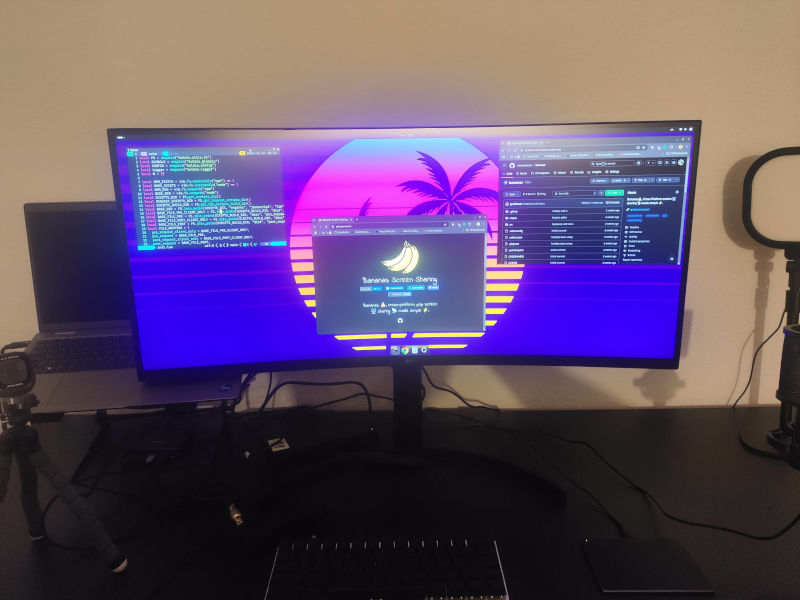
This is the hardware I use for my work:
- Laptop:
- Processor: Intel Core™ Ultra 7 165H 22-core
- RAM: 96GB DDR5
- SSD: 4TB NVME
- Keyboard: US International
- OS: CachyOS
- External screen: LG UltraWide Curved QHD Monitor 35WN75CP-B
- Keyboard: ZSA Voyager
- Touchpad: seenda Touchpad
- Mouse: Logitech G300s
- Microphone: Tonor Q9 USB Condenser Microphone
- Webcam: AnkerWork C310 Webcam
- Lighting: LitONES 2.7k - 6.5k





Various other stuff
This is some other stuff that I use on a daily basis, but doesn’t fit into any of the above categories:
- Watch: Amazfit Active Max (previously Amazfit Bip 6)
- Gaming:
- Streaming:
- Netflix
- Amazon Prime



AI
I have copilot.vim enabled most of the time.
I accept inline suggestions (ghost text) of copilot occasionally (I can’t really tell you how often, because I don’t keep track and even though I accept a suggestion sometimes, I might have to modify it).
I like to use ChatGPT for image generation like logos and open graph images.
On me using ChatGPT like a caveman
I also use ChatGPT in Google Chrome to type questions about certain parts of my code into the Web-UI and use the output in the Web-UI of ChatGPT to modify the code via Neovim (given that the output seems reasonable).
As an example: If I suspect a race in some part, I ask Chatty exactly this and if could tell me why there’s a race.
Old-school research
My default is still just googling stuff (old habits die hard), glancing over Stack Overflow posts, forums and Reddit (feels like Reddit is the new Stack Overflow?!), but I also switch to ChatGPT when I don’t find anything useful.
Large changeset per commit equals AI usage?
I use jj squash and jj rebase quite extensively.
Why is this part of the AI usage?
Because, people that are unfamiliar with commit hygiene and squashing tend to jump to assumptions/conclusions that something must be AI-generated, when they see a lot of changes in one commit.
If you look back on projects by me dating back more than a decade ago (way before the AI era started), you’ll find commits of 10k+ LOCs.
I try to squash, so that commits serve as
fully functional increments - my local oplog is a different story though).